
25.前台系统-微信登录
# 登录需求
登录采取弹出层的形式
登录方式
- 手机号码+手机验证码
- 无注册界面,第一次登录根据手机号判断系统是否存在,如果不存在则自动注册
- 微信扫描
- 微信扫描登录成功必须绑定手机号码
- 第一次扫描成功后绑定手机号,以后登录扫描直接登录成功
网关统一判断登录状态,如何需要登录,页面弹出登录层
# 关于OAuth2
提示
简要介绍OAuth2与微信登录流程
- name: 🏃 OAuth2 介绍
  desc: 'OAuth2 介绍'
  link: /pages/36da5f/
  bgColor: '#DFEEE7'
  textColor: '#2A3344'
2
3
4
5
# 微信登录实现
微信登录二维码以弹出层的形式打开,不是以页面形式,所以做法是不一样的,参考如下链接,上面有相关弹出层的方式 https://developers.weixin.qq.com/doc/oplatform/Website_App/WeChat_Login/Wechat_Login.html
本项目使用网站内嵌二维码微信登录
步骤1:在页面中先引入如下JS文件(支持https):
http://res.wx.qq.com/connect/zh_CN/htmledition/js/wxLogin.js
步骤2:在需要使用微信登录的地方实例以下JS对象
var obj = new WxLogin({
    self_redirect:true,
    id:"login_container",
    appid: "",
    scope: "",
    redirect_uri: "",
    state: "",
    style: "",
    href: ""
});
2
3
4
5
6
7
8
9
10
# 整体流程
- 通过接口把对应参数返回页面
- 在头部页面启动打开微信登录二维码
- 处理登录回调接口
- 回调返回页面通知微信登录层回调成功
- 如果是第一次扫描登录,则绑定手机号码,登录成功
# 返回微信登录参数 service-user
# 添加配置
在service-user模块中的application.properties文件中添加微信配置
修改服务端口为8160,用于微信登录回调使用
# 服务端口
server.port=8160
...

wx.open.app_id=wxed9954c01bb89b47
wx.open.app_secret=a7482517235173ddb4083788de60b90e
wx.open.redirect_url=http://localhost:8160/api/ucenter/wx/callback
yygh.baseUrl=http://localhost:3000
2
3
4
5
6
7
8
# 添加配置类
创建配置类com.stt.yygh.user.config.ConstantPropertiesUtil 读取微信的配置信息
package com.stt.yygh.user.config;

import org.springframework.beans.factory.InitializingBean;
import org.springframework.beans.factory.annotation.Value;
import org.springframework.stereotype.Component;

@Component
public class ConstantPropertiesUtil implements InitializingBean {

    @Value("${wx.open.app_id}")
    private String appId;

    @Value("${wx.open.app_secret}")
    private String appSecret;

    @Value("${wx.open.redirect_url}")
    private String redirectUrl;

    @Value("${yygh.baseUrl}")
    private String yyghBaseUrl;

    public static String WX_OPEN_APP_ID;
    public static String WX_OPEN_APP_SECRET;
    public static String WX_OPEN_REDIRECT_URL;

    public static String YYGH_BASE_URL;

    @Override
    public void afterPropertiesSet() throws Exception {
        WX_OPEN_APP_ID = appId;
        WX_OPEN_APP_SECRET = appSecret;
        WX_OPEN_REDIRECT_URL = redirectUrl;
        YYGH_BASE_URL = yyghBaseUrl;
    }
}
2
3
4
5
6
7
8
9
10
11
12
13
14
15
16
17
18
19
20
21
22
23
24
25
26
27
28
29
30
31
32
33
34
35
# 创建获取微信配置参数接口
在service-user中创建 WeixinApiController 类
注意:使用的是 @Controller 注解,因为下面实现的接口需要重定向到其他页面,因此不能使用@RestController 将所有的返回都变为json格式,那么要返回json格式的Result需要添加@ResponseBody 注解
package com.stt.yygh.user.controller;

import com.stt.yygh.common.result.Result;
import com.stt.yygh.user.config.ConstantPropertiesUtil;
import org.apache.commons.codec.Charsets;
import org.springframework.stereotype.Controller;
import org.springframework.web.bind.annotation.GetMapping;
import org.springframework.web.bind.annotation.RequestMapping;
import org.springframework.web.bind.annotation.ResponseBody;

import java.io.UnsupportedEncodingException;
import java.net.URLEncoder;
import java.util.HashMap;
import java.util.Map;

@Controller
@RequestMapping("/api/ucenter/wx")
public class WeixinApiController {

    //  获取微信登录参数
    @GetMapping("getLoginParam")
    @ResponseBody
    public Result getQRConnect() throws UnsupportedEncodingException {
        Map<String, Object> re = new HashMap<>(4);
        re.put("appid", ConstantPropertiesUtil.WX_OPEN_APP_ID);
        re.put("redirectUri", URLEncoder.encode(ConstantPropertiesUtil.WX_OPEN_REDIRECT_URL, Charsets.UTF_8.name()));
        re.put("scope", "snsapi_login");
        re.put("state", System.currentTimeMillis() + "");
        return Result.ok(re);
    }

}
2
3
4
5
6
7
8
9
10
11
12
13
14
15
16
17
18
19
20
21
22
23
24
25
26
27
28
29
30
31
32
微信登录时需要传递的参数
- scope:应用授权作用域,拥有多个作用域用逗号(,)分隔,网页应用目前仅填写snsapi_login
- state:用于保持请求和回调的状态,授权请求后原样带回给第三方。该参数可用于防止csrf攻击(跨站请求伪造攻击),建议第三方带上该参数,可设置为简单的随机数加session进行校验
# 配置网关 service-gateway
在service-gateway中配置相应路由参数
spring.cloud.gateway.routes[4].id=service-user
spring.cloud.gateway.routes[4].uri=lb://service-user
spring.cloud.gateway.routes[4].predicates= Path=/*/ucenter/**
2
3
# 前端显示二维码 yygh-site
在yygh-site项目中修改
# 封装api
创建 api/user/weixin.js文件,添加如下内容
import request from '@/utils/request'

const api_name = `/api/ucenter/wx`

export function getLoginParam() {
  return request({
    url: `${api_name}/getLoginParam`,
    method: `get`
  })
}
2
3
4
5
6
7
8
9
10
# 修改组件 my-header.vue
修改layouts/my-header.vue文件,添加微信二维码登录逻辑,编写weixinLogin()方法逻辑 注意new WxLogin初始化对象中需要指定id,该id就是登录的二维码显示的位置,使用了iframe嵌入
<template>
...
</template>

<script>
...
import { getLoginParam } from '@/api/user/weixin'

const defaultDialogAtrr = {
...
}
export default {
  data() {
    return {
...
    }
  },
  created() {
    this.showInfo()
  },
  mounted() {
...
    // 初始化微信js
    const script = document.createElement('script')
    script.type = 'text/javascript'
    script.src = 'https://res.wx.qq.com/connect/zh_CN/htmledition/js/wxLogin.js'
    document.body.appendChild(script)
  },
  methods: {
...
    weixinLogin() {
      this.dialogAtrr.showLoginType = 'weixin'
      getLoginParam().then(res => {
        var obj = new WxLogin({
          self_redirect: true,
          id: 'weixinLogin', // 需要显示的容器id
          appid: res.data.appid, // 公众号appid wx*******
          scope: res.data.scope, // 网页默认即可
          redirect_uri: res.data.redirectUri, // 授权成功后回调的url
          state: res.data.state, // 可设置为简单的随机数加session用来校验
          style: 'black', // 提供"black"、"white"可选。二维码的样式
          href: '' // 外部css文件url,需要https
        })
      })
    },
...
  }
}
</script>
2
3
4
5
6
7
8
9
10
11
12
13
14
15
16
17
18
19
20
21
22
23
24
25
26
27
28
29
30
31
32
33
34
35
36
37
38
39
40
41
42
43
44
45
46
47
48
49
# 测试
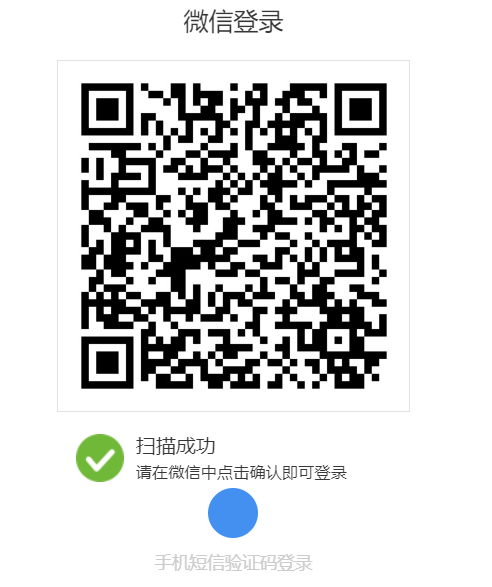
点击微信登录按键,用手机扫描但是没有点击同意时,显示如下
点击同意后显示
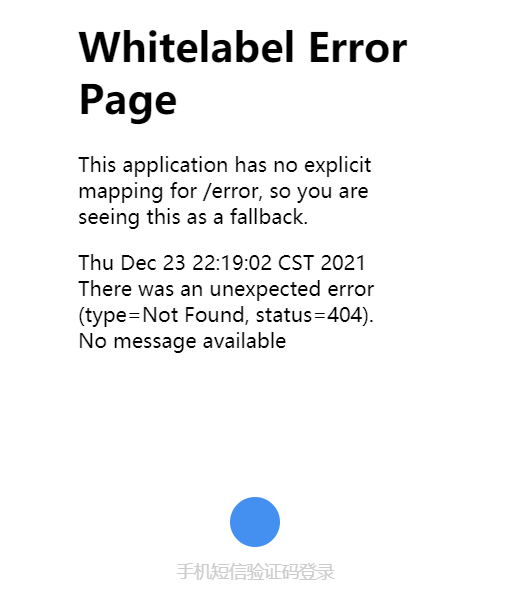
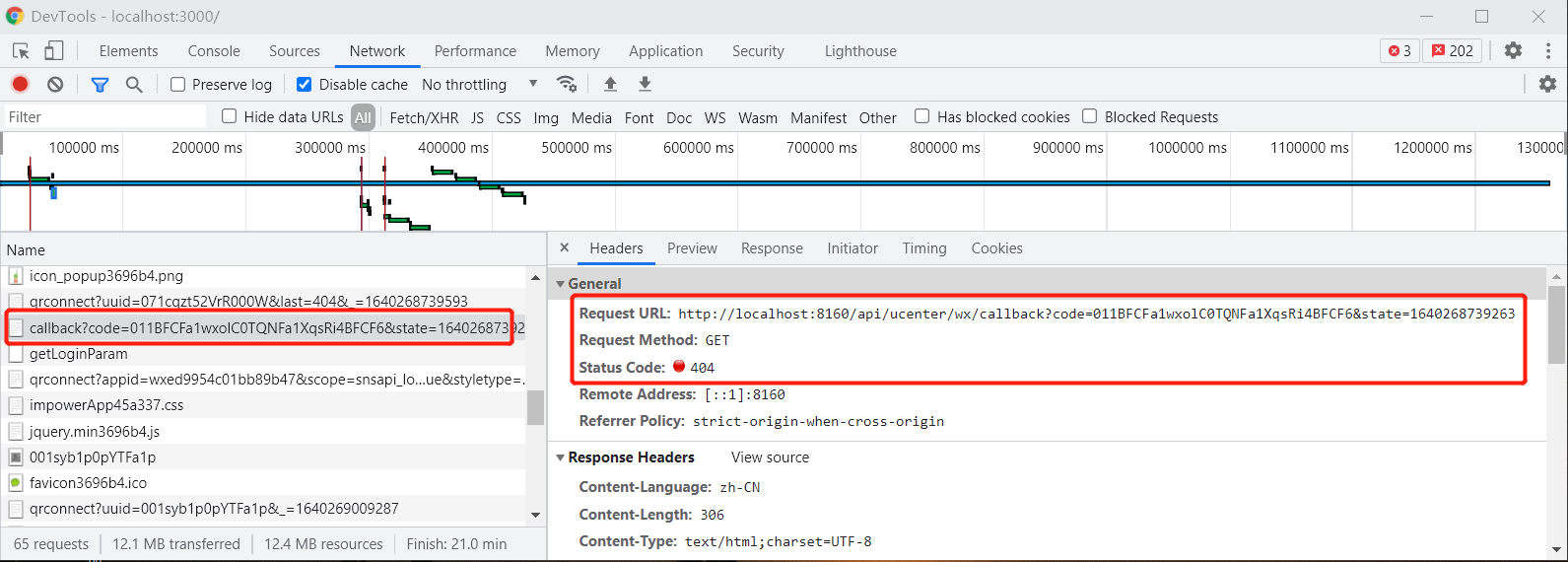
由于没有开发回调接口,因此报错404,该回调是微信返回给浏览器code信息,让浏览器访问localhost:8160/api/ucenter/callback接口,将code传递给服务器
# 处理微信回调接口 service-user
# 添加httpclient工具类
在service-user创建HttpClientUtils类,用于调用微信api获取用户信息
package com.stt.yygh.user.utils;

import org.apache.commons.io.IOUtils;
import org.apache.commons.lang.StringUtils;
import org.apache.http.Consts;
import org.apache.http.HttpEntity;
import org.apache.http.HttpResponse;
import org.apache.http.NameValuePair;
import org.apache.http.client.HttpClient;
import org.apache.http.client.config.RequestConfig;
import org.apache.http.client.config.RequestConfig.Builder;
import org.apache.http.client.entity.UrlEncodedFormEntity;
import org.apache.http.client.methods.HttpGet;
import org.apache.http.client.methods.HttpPost;
import org.apache.http.conn.ConnectTimeoutException;
import org.apache.http.conn.ssl.SSLConnectionSocketFactory;
import org.apache.http.conn.ssl.SSLContextBuilder;
import org.apache.http.conn.ssl.X509HostnameVerifier;
import org.apache.http.entity.ContentType;
import org.apache.http.entity.StringEntity;
import org.apache.http.impl.client.CloseableHttpClient;
import org.apache.http.impl.client.HttpClients;
import org.apache.http.impl.conn.PoolingHttpClientConnectionManager;
import org.apache.http.message.BasicNameValuePair;

import javax.net.ssl.SSLContext;
import javax.net.ssl.SSLSession;
import javax.net.ssl.SSLSocket;
import java.net.SocketTimeoutException;
import java.security.GeneralSecurityException;
import java.security.cert.X509Certificate;
import java.util.ArrayList;
import java.util.List;
import java.util.Map;
import java.util.Map.Entry;
import java.util.Set;

public class HttpClientUtils {

    public static final int connTimeout=10000;
    public static final int readTimeout=10000;
    public static final String charset="UTF-8";
    private static HttpClient client;

    static {
        PoolingHttpClientConnectionManager cm = new PoolingHttpClientConnectionManager();
        cm.setMaxTotal(128);
        cm.setDefaultMaxPerRoute(128);
        client = HttpClients.custom().setConnectionManager(cm).build();
    }

    public static String postParameters(String url, String parameterStr) throws Exception{
        return post(url,parameterStr,"application/x-www-form-urlencoded",charset,connTimeout,readTimeout);
    }

    public static String postParameters(String url, String parameterStr,String charset, Integer connTimeout, Integer readTimeout) throws ConnectTimeoutException, SocketTimeoutException, Exception{
        return post(url,parameterStr,"application/x-www-form-urlencoded",charset,connTimeout,readTimeout);
    }

    public static String postParameters(String url, Map<String, String> params) throws Exception {
        return postForm(url, params, null, connTimeout, readTimeout);
    }

    public static String postParameters(String url, Map<String, String> params, Integer connTimeout,Integer readTimeout) throws Exception {
        return postForm(url, params, null, connTimeout, readTimeout);
    }

    public static String get(String url) throws Exception {
        return get(url, charset, null, null);
    }

    public static String get(String url, String charset) throws Exception {
        return get(url, charset, connTimeout, readTimeout);
    }

    /**
     * 发送一个 Post 请求, 使用指定的字符集编码.
     *
     * @param url
     * @param body RequestBody
     * @param mimeType 例如 application/xml "application/x-www-form-urlencoded" a=1&b=2&c=3
     * @param charset 编码
     * @param connTimeout 建立链接超时时间,毫秒.
     * @param readTimeout 响应超时时间,毫秒.
     * @return ResponseBody, 使用指定的字符集编码.
     * @throws ConnectTimeoutException 建立链接超时异常
     * @throws SocketTimeoutException  响应超时
     * @throws Exception
     */
    public static String post(String url, String body, String mimeType,String charset, Integer connTimeout, Integer readTimeout) throws  Exception {
        HttpClient client = null;
        HttpPost post = new HttpPost(url);
        String result = "";
        try {
            if (StringUtils.isNotBlank(body)) {
                HttpEntity entity = new StringEntity(body, ContentType.create(mimeType, charset));
                post.setEntity(entity);
            }
            // 设置参数
            Builder customReqConf = RequestConfig.custom();
            if (connTimeout != null) customReqConf.setConnectTimeout(connTimeout);
            if (readTimeout != null) customReqConf.setSocketTimeout(readTimeout);
            post.setConfig(customReqConf.build());

            HttpResponse res;
            if (url.startsWith("https")) {
                // 执行 Https 请求.
                client = createSSLInsecureClient();
                res = client.execute(post);
            } else {
                // 执行 Http 请求.
                client = HttpClientUtils.client;
                res = client.execute(post);
            }
            result = IOUtils.toString(res.getEntity().getContent(), charset);
        } finally {
            post.releaseConnection();
            if (url.startsWith("https") && client != null&& client instanceof CloseableHttpClient) {
                ((CloseableHttpClient) client).close();
            }
        }
        return result;
    }

    /**
     * 提交form表单
     *
     * @param url
     * @param params
     * @param connTimeout
     * @param readTimeout
     * @return
     * @throws ConnectTimeoutException
     * @throws SocketTimeoutException
     * @throws Exception
     */
    public static String postForm(String url, Map<String, String> params, Map<String, String> headers, Integer connTimeout,Integer readTimeout) throws Exception {
        HttpClient client = null;
        HttpPost post = new HttpPost(url);
        try {
            if (params != null && !params.isEmpty()) {
                List<NameValuePair> formParams = new ArrayList<>();
                Set<Entry<String, String>> entrySet = params.entrySet();
                for (Entry<String, String> entry : entrySet) {
                    formParams.add(new BasicNameValuePair(entry.getKey(), entry.getValue()));
                }
                UrlEncodedFormEntity entity = new UrlEncodedFormEntity(formParams, Consts.UTF_8);
                post.setEntity(entity);
            }

            if (headers != null && !headers.isEmpty()) {
                for (Entry<String, String> entry : headers.entrySet()) {
                    post.addHeader(entry.getKey(), entry.getValue());
                }
            }
            // 设置参数
            Builder customReqConf = RequestConfig.custom();
            if (connTimeout != null) customReqConf.setConnectTimeout(connTimeout);
            if (readTimeout != null) customReqConf.setSocketTimeout(readTimeout);
            post.setConfig(customReqConf.build());
            HttpResponse res;
            if (url.startsWith("https")) {
                // 执行 Https 请求.
                client = createSSLInsecureClient();
                res = client.execute(post);
            } else {
                // 执行 Http 请求.
                client = HttpClientUtils.client;
                res = client.execute(post);
            }
            return IOUtils.toString(res.getEntity().getContent(), "UTF-8");
        } finally {
            post.releaseConnection();
            if (url.startsWith("https") && client != null
                    && client instanceof CloseableHttpClient) {
                ((CloseableHttpClient) client).close();
            }
        }
    }

    /**
     * 发送一个 GET 请求
     */
    public static String get(String url, String charset, Integer connTimeout,Integer readTimeout) throws  Exception {
        HttpClient client = null;
        HttpGet get = new HttpGet(url);
        String result = "";
        try {
            // 设置参数
            Builder customReqConf = RequestConfig.custom();
            if (connTimeout != null) customReqConf.setConnectTimeout(connTimeout);
            if (readTimeout != null) customReqConf.setSocketTimeout(readTimeout);
            get.setConfig(customReqConf.build());
            HttpResponse res ;
            if (url.startsWith("https")) {
                // 执行 Https 请求.
                client = createSSLInsecureClient();
                res = client.execute(get);
            } else {
                // 执行 Http 请求.
                client = HttpClientUtils.client;
                res = client.execute(get);
            }
            result = IOUtils.toString(res.getEntity().getContent(), charset);
        } finally {
            get.releaseConnection();
            if (url.startsWith("https") && client != null && client instanceof CloseableHttpClient) {
                ((CloseableHttpClient) client).close();
            }
        }
        return result;
    }

    /**
     * 从 response 里获取 charset
     */
    @SuppressWarnings("unused")
    private static String getCharsetFromResponse(HttpResponse ressponse) {
        // Content-Type:text/html; charset=GBK
        if (ressponse.getEntity() != null  && ressponse.getEntity().getContentType() != null && ressponse.getEntity().getContentType().getValue() != null) {
            String contentType = ressponse.getEntity().getContentType().getValue();
            if (contentType.contains("charset=")) {
                return contentType.substring(contentType.indexOf("charset=") + 8);
            }
        }
        return null;
    }

    /**
     * 创建 SSL连接
     * @return
     * @throws GeneralSecurityException
     */
    private static CloseableHttpClient createSSLInsecureClient() throws GeneralSecurityException {
        try {
            SSLContext sslContext = new SSLContextBuilder().loadTrustMaterial(null, (chain, authType) -> true).build();
            SSLConnectionSocketFactory sslsf = new SSLConnectionSocketFactory(sslContext, new X509HostnameVerifier() {
                @Override
                public boolean verify(String arg0, SSLSession arg1) {
                    return true;
                }
                @Override
                public void verify(String host, SSLSocket ssl)  { }
                @Override
                public void verify(String host, X509Certificate cert)  { }
                @Override
                public void verify(String host, String[] cns, String[] subjectAlts)  { }
            });
            return HttpClients.custom().setSSLSocketFactory(sslsf).build();
        } catch (GeneralSecurityException e) {
            throw e;
        }
    }
}
2
3
4
5
6
7
8
9
10
11
12
13
14
15
16
17
18
19
20
21
22
23
24
25
26
27
28
29
30
31
32
33
34
35
36
37
38
39
40
41
42
43
44
45
46
47
48
49
50
51
52
53
54
55
56
57
58
59
60
61
62
63
64
65
66
67
68
69
70
71
72
73
74
75
76
77
78
79
80
81
82
83
84
85
86
87
88
89
90
91
92
93
94
95
96
97
98
99
100
101
102
103
104
105
106
107
108
109
110
111
112
113
114
115
116
117
118
119
120
121
122
123
124
125
126
127
128
129
130
131
132
133
134
135
136
137
138
139
140
141
142
143
144
145
146
147
148
149
150
151
152
153
154
155
156
157
158
159
160
161
162
163
164
165
166
167
168
169
170
171
172
173
174
175
176
177
178
179
180
181
182
183
184
185
186
187
188
189
190
191
192
193
194
195
196
197
198
199
200
201
202
203
204
205
206
207
208
209
210
211
212
213
214
215
216
217
218
219
220
221
222
223
224
225
226
227
228
229
230
231
232
233
234
235
236
237
238
239
240
241
242
243
244
245
246
247
248
249
250
251
252
253
254
# 添加回调接口获取access_token以及用户信息
在service-user编写回调接口 /api/ucenter/wx/callback
该接口调用微信官方api获取到用信息并返回给前端页面进行展示
如果本地库中已经存在该用户,则不查询用户信息,直接从本地库中获取
如果本地库不存在该用户信息,说明第一次注册,从微信官方api中获取用户信息,存储在本地
package com.stt.yygh.user.controller;

import com.alibaba.fastjson.JSONObject;
import com.baomidou.mybatisplus.core.conditions.query.QueryWrapper;
import com.stt.yygh.common.exception.YyghException;
import com.stt.yygh.common.helper.JwtHelper;
import com.stt.yygh.common.result.Result;
import com.stt.yygh.common.result.ResultCodeEnum;
import com.stt.yygh.model.user.UserInfo;
import com.stt.yygh.user.config.ConstantPropertiesUtil;
import com.stt.yygh.user.service.UserInfoService;
import com.stt.yygh.user.utils.HttpClientUtils;
import lombok.AllArgsConstructor;
import lombok.Data;
import lombok.extern.slf4j.Slf4j;
import org.apache.commons.codec.Charsets;
import org.springframework.beans.factory.annotation.Autowired;
import org.springframework.stereotype.Controller;
import org.springframework.util.StringUtils;
import org.springframework.web.bind.annotation.GetMapping;
import org.springframework.web.bind.annotation.RequestMapping;
import org.springframework.web.bind.annotation.ResponseBody;

import java.io.UnsupportedEncodingException;
import java.net.URLEncoder;
import java.util.HashMap;
import java.util.Map;
import java.util.Objects;

@Slf4j
@Controller
@RequestMapping("/api/ucenter/wx")
public class WeixinApiController {

    @Autowired
    private UserInfoService userInfoService;
...

    // 微信登录回调 传递code,服务通过code再访问微信获取用户名称等信息
    @RequestMapping("callback")
    public String callback(String code, String state) throws UnsupportedEncodingException {
        System.out.println("微信授权服务器回调...");
        System.out.println("state = " + state);
        System.out.println("code = " + code);
        if (StringUtils.isEmpty(state) || StringUtils.isEmpty(code)) {
            log.error("非法回调请求");
            throw new YyghException(ResultCodeEnum.ILLEGAL_CALLBACK_REQUEST_ERROR);
        }
        WxReturnInfo accessInfo = this.getUserInfoAccessInfo(code);

        // 从本地数据库查看是否存在,存在则直接返回,不存在则存储
        UserInfo userInfo = userInfoService.getByOpenid(accessInfo.openId);
        if (Objects.isNull(userInfo)) {
            userInfo = this.getUserInfo(accessInfo);
            userInfoService.save(userInfo);
        }
        return "redirect:" + getReturnUrl(userInfo);
    }

    // 返回重定向路径
    private String getReturnUrl(UserInfo userInfo) throws UnsupportedEncodingException {
        String token = JwtHelper.createToken(userInfo.getId(), userInfo.getName());
        Boolean hasPhone = !StringUtils.isEmpty(userInfo.getPhone());
        String name = userInfo.getName();
        if (StringUtils.isEmpty(name)) {
            name = userInfo.getNickName();
        }
        if (StringUtils.isEmpty(name)) {
            name = userInfo.getPhone();
        }
        // 重定向到weixin/callback页面读取用户名称和openid
        return String.format(ConstantPropertiesUtil.YYGH_BASE_URL + "/weixin/callback?token=%s&openid=%s&name=%s&hasPhone=%b",
                token, userInfo.getOpenid(), URLEncoder.encode(name, Charsets.UTF_8.name()), hasPhone);
    }

    private UserInfo getUserInfo(WxReturnInfo accessInfo) {
        String url = String.format("https://api.weixin.qq.com/sns/userinfo?access_token=%s&openid=%s",
                accessInfo.accessToken, accessInfo.openId);

        String resultUserInfo;
        try {
            resultUserInfo = HttpClientUtils.get(url);
            System.out.println("使用access_token获取用户信息的结果 = " + resultUserInfo);
        } catch (Exception e) {
            throw new YyghException(ResultCodeEnum.FETCH_USERINFO_ERROR);
        }

        JSONObject user = JSONObject.parseObject(resultUserInfo);
        if (!StringUtils.isEmpty(user.getString("errcode"))) {
            log.error("获取用户信息失败:" + user.getString("errcode") + user.getString("errmsg"));
            throw new YyghException(ResultCodeEnum.FETCH_USERINFO_ERROR);
        }
        //解析用户信息
        String nickname = user.getString("nickname");
//        String headimgurl = user.getString("headimgurl"); // 头像url

        UserInfo userInfo = new UserInfo();
        userInfo.setOpenid(accessInfo.openId);
        userInfo.setNickName(nickname);
        userInfo.setStatus(1);
        return userInfo;
    }

    // 通过code获取用户信息的微信 url
    private WxReturnInfo getUserInfoAccessInfo(String code) {
        // 拼接访问微信获取用户信息url
        String accessTokenUrl = String.format("https://api.weixin.qq.com/sns/oauth2/access_token?appid=%s&secret=%s&code=%s&grant_type=authorization_code",
                ConstantPropertiesUtil.WX_OPEN_APP_ID,
                ConstantPropertiesUtil.WX_OPEN_APP_SECRET,
                code);
        String result;
        try {
            result = HttpClientUtils.get(accessTokenUrl);
            System.out.println("使用code换取的access_token结果 = " + result);
        } catch (Exception e) {
            throw new YyghException(ResultCodeEnum.FETCH_ACCESSTOKEN_FAILD);
        }
        // 解析结果获取access_token和openid,去拉取用户信息
        JSONObject resultJson = JSONObject.parseObject(result);
        if (!StringUtils.isEmpty(resultJson.getString("errcode"))) {
            log.error("获取access_token失败:" + resultJson.getString("errcode") + resultJson.getString("errmsg"));
            throw new YyghException(ResultCodeEnum.FETCH_ACCESSTOKEN_FAILD);
        }
        String accessToken = resultJson.getString("access_token");
        String openId = resultJson.getString("openid");
        log.info(accessToken);
        log.info(openId);

        return new WxReturnInfo(accessToken, openId);

    }

    @Data
    @AllArgsConstructor
    class WxReturnInfo {
        private String accessToken;
        private String openId;
    }


}
2
3
4
5
6
7
8
9
10
11
12
13
14
15
16
17
18
19
20
21
22
23
24
25
26
27
28
29
30
31
32
33
34
35
36
37
38
39
40
41
42
43
44
45
46
47
48
49
50
51
52
53
54
55
56
57
58
59
60
61
62
63
64
65
66
67
68
69
70
71
72
73
74
75
76
77
78
79
80
81
82
83
84
85
86
87
88
89
90
91
92
93
94
95
96
97
98
99
100
101
102
103
104
105
106
107
108
109
110
111
112
113
114
115
116
117
118
119
120
121
122
123
124
125
126
127
128
129
130
131
132
133
134
135
136
137
138
139
140
141
142
在 UserInfoService 中添加getByOpenid接口
package com.stt.yygh.user.service;
...
public interface UserInfoService extends IService<UserInfo> {
...
    UserInfo getByOpenid(String openId);
}
2
3
4
5
6
在 UserInfoServiceImpl 添加 getByOpenid 实现
package com.stt.yygh.user.service.impl;
...

@Service
public class UserInfoServiceImpl extends ServiceImpl<UserInfoMapper, UserInfo> implements UserInfoService {
...

    @Override
    public UserInfo getByOpenid(String openId) {
        QueryWrapper<UserInfo> queryWrapper = new QueryWrapper<>();
        queryWrapper.eq("openid", openId);
        return baseMapper.selectOne(queryWrapper);
    }
...
}
2
3
4
5
6
7
8
9
10
11
12
13
14
15
# 回调返回页面 yygh-site
在上一节中,最终回调到了 /weixin/callback 页面,并带上了用户信息,下面实现该页面逻辑
在 yygh-site 项目中添加页面,实现思路如下
- 期望返回一个空页面,然后跟登录层通信,本质一个过渡页面
- 需要给这个过渡页面定义一个空模板
# 定义空布局模块
添加空模板组件:/layouts/empty.vue
<template>
  <div>
    <nuxt/>
  </div>
</template>
2
3
4
5
# 实现回调返回的页面
根据返回路径/weixin/callback,创建组件/pages/weixin/callback.vue
<template>
  <div></div>
</template>
<script>
export default {
  layout: 'empty', // 指定布局,指定empty
  data() {
    return {}
  },
  mounted() {
    // 读取url中的参数,注意使用this.$route.query对象读取 url中?后面的参数
    let token = this.$route.query.token
    let name = this.$route.query.name
    let openid = this.$route.query.openid
    let hasPhone = this.$route.query.hasPhone
    // 调用父vue方法,实际上可以将loginEvent抽取成公共模块
    window.parent.loginEvent.$emit('loginCallback', name, token, openid, hasPhone)
  }
}
</script>
2
3
4
5
6
7
8
9
10
11
12
13
14
15
16
17
18
19
20
# 修改my-header.vue模块
在my-header.vue模块中添加监听方法,进行微信登录回调,判断是否有手机号,没有手机号,则显示手机登录页面,绑定手机,否则登录成功
<template>
  <div class="header-container">
...
  </div>
</template>

<script>
...
export default {
  data() {
    return {
  ...
    }
  },
  created() {
    this.showInfo()
  },
  mounted() {
    // 注册全局登录事件对象
    window.loginEvent = new Vue()
...
    // 微信登录回调处理
    loginEvent.$on('loginCallback', (name, token, openid, hasPhone) => {
      this.loginCallback(name, token, openid, hasPhone)
    })
  },
  methods: {
 ...
    loginCallback(name, token, openid, hasPhone) {
      this.userInfo.openid = openid
      if (hasPhone === 'false') {
        // 打开手机登录层,绑定手机号,改逻辑与手机登录一致
        this.showLogin()
      } else {
        this.setCookies(name, token)
      }
    },
    ...
  }
}
</script>
2
3
4
5
6
7
8
9
10
11
12
13
14
15
16
17
18
19
20
21
22
23
24
25
26
27
28
29
30
31
32
33
34
35
36
37
38
39
40
41
# 绑定手机号码 service-user
由于在上一步,微信注册成功后,用户信息没有手机号码,那么会一直留在手机登录页面,需要手机绑定成功登录后才跳转,因此需要修改手机登录逻辑
修改UserInfoServiceImpl 中的登录逻辑,判断是否包含openid,包含openid登录的,则更新phone信息
package com.stt.yygh.user.service.impl;
...
@Service
public class UserInfoServiceImpl extends ServiceImpl<UserInfoMapper, UserInfo> implements UserInfoService {

    @Autowired
    private RedisTemplate<String, String> redisTemplate;

    @Override
    public Map<String, Object> login(LoginVo loginVo) {
        String phone = loginVo.getPhone();
        String code = loginVo.getCode();
        //校验参数
        if (StringUtils.isEmpty(phone) || StringUtils.isEmpty(code)) {
            throw new YyghException(ResultCodeEnum.PARAM_ERROR);
        }

        // 校验校验验证码
        String phoneCode = redisTemplate.opsForValue().get(phone);
        if (!Objects.equals(phoneCode, code)) {
            throw new YyghException(ResultCodeEnum.CODE_ERROR);
        }

        UserInfo userInfo;
        if (!StringUtils.isEmpty(loginVo.getOpenid())) {
            // 通过openid判断是否存在,存在则更新手机号
            userInfo = getByOpenid(loginVo.getOpenid());
            if(Objects.isNull(userInfo)) {
                throw new YyghException(ResultCodeEnum.DATA_ERROR);
            }
            userInfo.setPhone(loginVo.getPhone());
            // 更新userInfo
            this.updateById(userInfo);
        } else {
            // 通过手机号获取 会员,如果存在则返回,如果不存在则创建
            userInfo = saveUserInfoIfNotExistsByPhone(phone);
        }

        String name = getUserInfoName(userInfo);
        Map<String, Object> map = new HashMap<>();
        map.put("name", name);
        // jwt生成token字符串
        String token = JwtHelper.createToken(userInfo.getId(), name);
        map.put("token", token);
        return map;
    }

...
}
2
3
4
5
6
7
8
9
10
11
12
13
14
15
16
17
18
19
20
21
22
23
24
25
26
27
28
29
30
31
32
33
34
35
36
37
38
39
40
41
42
43
44
45
46
47
48
49
# 附:my-header.vue完整代码
点击查看
<template>
<div class="header-container">
<div class="wrapper">
<!-- logo -->
<div class="left-wrapper v-link selected">
<img style="width: 50px" width="50" height="50" src="~assets/images/logo.png">
<span class="text">尚医通 预约挂号统一平台</span>
</div>
<!-- 搜索框 -->
<div class="search-wrapper">
<div class="hospital-search animation-show">
<el-autocomplete class="search-input small" prefix-icon="el-icon-search"
v-model="state" :fetch-suggestions="querySearchAsync" placeholder="点击输入医院名称"
@select="handleSelect">
<span slot="suffix" class="search-btn v-link highlight clickable selected">搜索 </span>
</el-autocomplete>
</div>
</div>
<!-- 右侧 -->
<div class="right-wrapper">
<span class="v-link clickable">帮助中心</span>
<span v-if="name === ''" class="v-link clickable" @click="showLogin()" id="loginDialog">登录/注册</span>
<el-dropdown v-if="name !== ''" @command="loginMenu">
<span class="el-dropdown-link">{{ name }}<i class="el-icon-arrow-down el-icon--right"></i></span>
<el-dropdown-menu class="user-name-wrapper" slot="dropdown">
<el-dropdown-item command="/user">实名认证</el-dropdown-item>
<el-dropdown-item command="/order">挂号订单</el-dropdown-item>
<el-dropdown-item command="/patient">就诊人管理</el-dropdown-item>
<el-dropdown-item command="/logout" divided>退出登录</el-dropdown-item>
</el-dropdown-menu>
</el-dropdown>
</div>
</div>
<!-- 登录弹出层 -->
<!-- 增加v-if dialogUserFormVisible 用于 解决第一次样式错乱的bug -->
<el-dialog :visible.sync="dialogUserFormVisible" v-if="dialogUserFormVisible"
:append-to-body="true"
:modal-append-to-body="false"
width="960px" @close="closeDialog()">
<div class="container">
<!-- 手机登录 #start -->
<div class="operate-view" v-if="dialogAtrr.showLoginType === 'phone'">
<div class="wrapper" style="width: 100%">
<div class="mobile-wrapper" style="position: static;width: 70%">
<span class="title">{{ dialogAtrr.labelTips }}</span>
<el-form>
<el-form-item>
<el-input v-model="dialogAtrr.inputValue" :placeholder="dialogAtrr.placeholder"
:maxlength="dialogAtrr.maxlength" class="input v-input">
<span slot="suffix" class="sendText v-link"
v-if="dialogAtrr.second>0">{{ dialogAtrr.second }}s</span>
<span slot="suffix" class="sendText v-link highlight clickable selected"
v-if="dialogAtrr.second === 0" @click="getCodeFun()">重新发送</span>
</el-input>
</el-form-item>
</el-form>
<div class="send-button v-button" @click="btnClick()">{{ dialogAtrr.loginBtn }}</div>
</div>
<div class="bottom">
<div class="wechat-wrapper" @click="weixinLogin()"><span
class="iconfont icon"></span></div>
<span class="third-text">第三方账号登录</span></div>
</div>
</div>
<!-- 手机登录 #end -->
<!-- 微信登录 #start -->
<div class="operate-view" v-if="dialogAtrr.showLoginType==='weixin'">
<div class="wrapper wechat" style="height: 400px">
<div>
<div id="weixinLogin"></div>
</div>
<div class="bottom wechat" style="margin-top: -80px;">
<div class="phone-container">
<div class="phone-wrapper" @click="phoneLogin()">
<span class="iconfont icon"></span>
</div>
<span class="third-text">手机短信验证码登录</span>
</div>
</div>
</div>
</div>
<!-- 微信登录 #end -->
<div class="info-wrapper">
<div class="code-wrapper">
<div><img src="//img.114yygh.com/static/web/code_login_wechat.png" class="code-img">
<div class="code-text"><span class="iconfont icon"></span>微信扫一扫关注</div>
<div class="code-text"> “快速预约挂号”</div>
</div>
<div class="wechat-code-wrapper"><img src="//img.114yygh.com/static/web/code_app.png" class="code-img">
<div class="code-text"> 扫一扫下载</div>
<div class="code-text"> “预约挂号”APP</div>
</div>
</div>
<div class="slogan">
<div>xxxxxx官方指定平台</div>
<div>快速挂号 安全放心</div>
</div>
</div>
</div>
</el-dialog>
</div>
</template>
<script>
import cookie from 'js-cookie'
import Vue from 'vue'
import { login } from '@/api/user/userInfo'
import { sendCode } from '@/api/msm/msm'
import { getLoginParam } from '@/api/user/weixin'
const defaultDialogAtrr = {
showLoginType: 'phone', // 控制手机登录与微信登录切换
labelTips: '手机号码', // 输入框提示
inputValue: '', // 输入框绑定对象
placeholder: '请输入您的手机号', // 输入框placeholder
maxlength: 11, // 输入框长度控制
loginBtn: '获取验证码', // 登录按钮或获取验证码按钮文本
sending: true, // 是否可以发送验证码
second: -1, // 倒计时间 second>0 : 显示倒计时 second=0 :重新发送 second=-1 :什么都不显示
clearSmsTime: null // 倒计时定时任务引用 关闭登录层清除定时任务
}
export default {
data() {
return {
state: '',
userInfo: {
phone: '',
code: '',
openid: ''
},
dialogUserFormVisible: false,
// 弹出层相关属性
dialogAtrr: defaultDialogAtrr,
name: '' // 用户登录显示的名称
}
},
created() {
this.showInfo()
},
mounted() {
// 注册全局登录事件对象
window.loginEvent = new Vue()
// 监听登录事件
loginEvent.$on('loginDialogEvent', function () {
document.getElementById('loginDialog').click()
})
// 触发事件,显示登录层:loginEvent.$emit('loginDialogEvent')
// 初始化微信js
const script = document.createElement('script')
script.type = 'text/javascript'
script.src = 'https://res.wx.qq.com/connect/zh_CN/htmledition/js/wxLogin.js'
document.body.appendChild(script)
// 微信登录回调处理
loginEvent.$on('loginCallback', (name, token, openid, hasPhone) => {
this.loginCallback(name, token, openid, hasPhone)
})
},
methods: {
querySearchAsync() {
},
btnClick() { // 绑定登录或获取验证码按钮
if (this.dialogAtrr.loginBtn === '获取验证码') { // 判断是获取验证码还是登录
this.userInfo.phone = this.dialogAtrr.inputValue
// 获取验证码
this.getCodeFun()
return
}
this.login()
},
showLogin() { // 绑定登录,点击显示登录层
this.dialogUserFormVisible = true
// 初始化登录层相关参数
this.dialogAtrr = { ...defaultDialogAtrr }
},
login() {
this.userInfo.code = this.dialogAtrr.inputValue
if (this.dialogAtrr.loginBtn === '正在提交...') {
this.$message.error('重复提交')
return
}
if (this.userInfo.code === '') {
this.$message.error('验证码必须输入')
return
}
if (this.userInfo.code.length !== 6) {
this.$message.error('验证码格式不正确')
return
}
this.dialogAtrr.loginBtn = '正在提交...'
login(this.userInfo).then(res => {
console.log(res.data)
this.setCookies(res.data.name, res.data.token) // 登录成功 设置cookie
}).catch(e => {
this.dialogAtrr.loginBtn = '马上登录'
})
},
setCookies(name, token) {
cookie.set('token', token, { domain: 'localhost' })
cookie.set('name', name, { domain: 'localhost' })
window.location.reload()
},
getCodeFun() { // 获取验证码
if (!(/^1[34578]\d{9}$/.test(this.userInfo.phone))) {
this.$message.error('手机号码不正确')
return
}
// 初始化验证码相关属性
this.dialogAtrr.inputValue = ''
this.dialogAtrr.placeholder = '请输入验证码'
this.dialogAtrr.maxlength = 6
this.dialogAtrr.loginBtn = '马上登录'
// 控制重复发送
if (!this.dialogAtrr.sending) return
// 发送短信验证码
this.timeDown()
this.dialogAtrr.sending = false
sendCode(this.userInfo.phone).then(res => {
this.timeDown()
}).catch(e => {
this.$message.error('发送失败,重新发送')
// 发送失败,回到重新获取验证码界面
this.showLogin()
})
},
// 倒计时
timeDown() {
clearInterval(this.clearSmsTime)
this.dialogAtrr.second = 60
this.dialogAtrr.labelTips = '验证码已发送至' + this.userInfo.phone
this.clearSmsTime = setInterval(() => {
--this.dialogAtrr.second
if (this.dialogAtrr.second < 1) {
clearInterval(this.clearSmsTime)
this.dialogAtrr.sending = true
this.dialogAtrr.second = 0
}
}, 1000)
},
// 关闭登录层
closeDialog() {
if (this.clearSmsTime) {
clearInterval(this.clearSmsTime)
}
},
showInfo() {
let token = cookie.get('token')
if (token) {
this.name = cookie.get('name')
console.log(this.name)
}
},
loginMenu(command) {
if ('/logout' === command) {
cookie.set('name', '', { domain: 'localhost' })
cookie.set('token', '', { domain: 'localhost' })
//跳转页面
window.location.href = '/'
} else {
window.location.href = command
}
},
handleSelect(item) {
window.location.href = '/hospital/' + item.hoscode
},
weixinLogin() {
this.dialogAtrr.showLoginType = 'weixin'
getLoginParam().then(res => {
var obj = new WxLogin({
self_redirect: true,
id: 'weixinLogin', // 需要显示的容器id
appid: res.data.appid, // 公众号appid wx*******
scope: res.data.scope, // 网页默认即可
redirect_uri: res.data.redirectUri, // 授权成功后回调的url
state: res.data.state, // 可设置为简单的随机数加session用来校验
style: 'black', // 提供"black"、"white"可选。二维码的样式
href: '' // 外部css文件url,需要https
})
})
},
loginCallback(name, token, openid, hasPhone) {
this.userInfo.openid = openid
if (hasPhone === 'false') {
// 打开手机登录层,绑定手机号,改逻辑与手机登录一致
this.showLogin()
} else {
this.setCookies(name, token)
}
},
phoneLogin() {
this.dialogAtrr.showLoginType = 'phone'
this.showLogin()
}
}
}
</script>
2
3
4
5
6
7
8
9
10
11
12
13
14
15
16
17
18
19
20
21
22
23
24
25
26
27
28
29
30
31
32
33
34
35
36
37
38
39
40
41
42
43
44
45
46
47
48
49
50
51
52
53
54
55
56
57
58
59
60
61
62
63
64
65
66
67
68
69
70
71
72
73
74
75
76
77
78
79
80
81
82
83
84
85
86
87
88
89
90
91
92
93
94
95
96
97
98
99
100
101
102
103
104
105
106
107
108
109
110
111
112
113
114
115
116
117
118
119
120
121
122
123
124
125
126
127
128
129
130
131
132
133
134
135
136
137
138
139
140
141
142
143
144
145
146
147
148
149
150
151
152
153
154
155
156
157
158
159
160
161
162
163
164
165
166
167
168
169
170
171
172
173
174
175
176
177
178
179
180
181
182
183
184
185
186
187
188
189
190
191
192
193
194
195
196
197
198
199
200
201
202
203
204
205
206
207
208
209
210
211
212
213
214
215
216
217
218
219
220
221
222
223
224
225
226
227
228
229
230
231
232
233
234
235
236
237
238
239
240
241
242
243
244
245
246
247
248
249
250
251
252
253
254
255
256
257
258
259
260
261
262
263
264
265
266
267
268
269
270
271
272
273
274
275
276
277
278
279
280
281
282
283
284
285
286
287
288
289
290
291
292
293
294
295
296
297
298